
AI Marketing SaaS Product Design
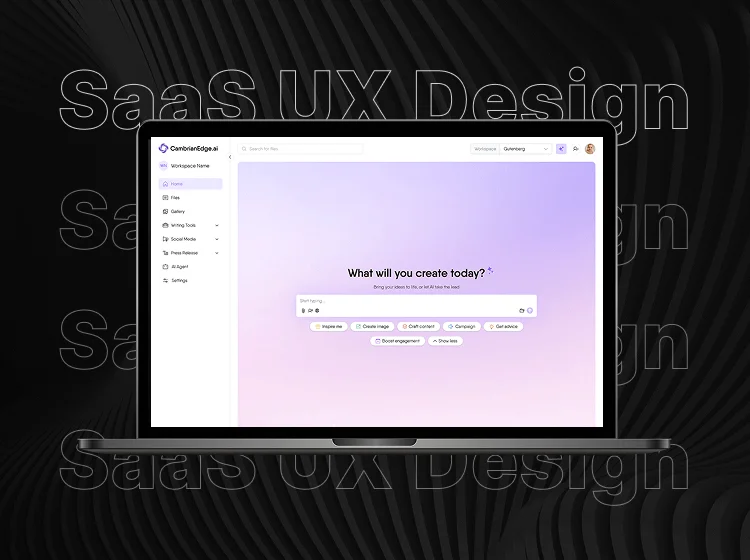
CambrianEdge.ai — End-to-End AI SaaS Product Design
Duration: 2024 – 2025
Role: Product Designer
Team: Collaborated closely with stakeholders, content strategists, developers, product managers, and marketing teams
Tools: Figma, Miro, Notion, Excel, Google Sheets, FigJam, Pitch
Problem Statement: Startups faced difficulties managing AI-powered marketing platforms that cater both to technical users and marketers. The goal was to design a comprehensive SaaS product that simplifies AI content generation and campaign management through intuitive workflows and scalable UI.
Overview: Designed a full-stack AI SaaS platform from ideation through launch, prioritizing seamless user journeys and scalable, future-proof interfaces that adapt easily as features grow.
How I Designed CambrianEdge.ai: Turning Complexity Into Everyday Simplicity for Startups and NGOs
CambrianEdge.ai started with a big idea: what if startups and NGOs could do modern content marketing easily without needing a technical team or learning a complex tool? As the sole designer behind this product, I set out to turn that vision into something real, practical, and friendly—something that feels like a helpful sidekick rather than another piece of software to fight with.
Why This Product?
Talking to founders, nonprofit managers, and solo freelancers gave me one clear message: most “AI tools” were built for big teams with lots of time, money, or tech know-how. The typical user just wanted to create content, schedule posts, and see results—without wasting time or getting frustrated.
So, I researched broadly—reading industry reports, surveys, and opinion pieces. Everything pointed to one need: give small organizations the power of AI, without any of the headaches.

Learning from What’s Out There
I dove into competitive analysis: not just using Jasper, Writesonic, Peppertype, and CopyAI, but breaking down their sign-up, dashboards, and daily flows. Most made you jump through hoops, or left you searching for the right button. The best ones greeted you, guided you, and let you see results fast.
This research was my checklist—what I’d do better, and what I’d skip.

Designing with Psychology in Mind
After studying competitors like Jasper and Writesonic, I realized these tools weren’t just built well—they cleverly guided users by tapping into human psychology. They use clear buttons and trustworthy messages to build confidence, break complex tasks into simple questions to avoid decision overload, and show progress bars that make users want to finish.
Small animations and helpful suggestions make the experience feel friendly and rewarding, not frustrating. Keeping these psychological “nudges” in mind, I designed CambrianEdge.ai to feel supportive and easy—helping users move forward naturally without feeling lost or overwhelmed.

Putting Users at the Center
I built user personas from interviews and early adopter feedback:
Emily, an NGO leader, strives to share impactful stories while managing limited resources.
Michael, running a marketing agency, needs tools that streamline team collaboration and deliver quick results.
Sara, founder of a tech startup, juggles multiple roles and values fast, intuitive workflows to keep her moving forward.
By mapping each user’s journey, we identified pain points and moments of delight, always looping back feedback into sketches and low-fi wireframes.

Designing the Journey
My design process was hands-on and fluid. I began with rough sketches and wireframes, then moved into detailed Figma flows, always keeping in mind how users like Emily, Michael, or Sara would move from their initial idea to that satisfying “aha” moment with as little friction as possible.

Before, the signup screen was just a simple form—bare and straightforward. After, I redesigned it to include social proofing points right on the screen, helping users build trust and confidence from their very first interaction. This subtle addition made signing up feel more credible and reassuring without adding complexity. Likewise, I built each screen carefully, grounding every design decision in thorough research to ensure it truly met user needs and inspired confidence at every step.

This iterative approach ensured the product didn’t just look good on paper but felt intuitive and aligned with real user needs from day one.
One of the highlights of the platform is its seamless social media management—users can connect multiple channels, create posts with clear CTAs, and organize drafts, scheduled posts, and approvals all in one place. Due to NDA restrictions, I’m unable to show detailed screens here, but this feature was carefully designed to provide real-time post previews and intuitive editing for a smooth, confident content experience across platforms.

Throughout this phase, Figma was my design playground. Its interactive prototypes allowed me to simulate real user flows, test assumptions, and gather feedback early. Every iteration was directly informed by testing—identifying pain points or confusion, then refining UI and flows to remove barriers.

User Flows & Improvements
Alongside designing screens, I created detailed user flow diagrams that mapped each step users would take through the product, from entry points to goal completion. At every stage, I noted potential friction points and improvement opportunities.
By visualizing the user journey, I identified where users might hesitate or drop off—such as complex upload processes or unclear navigation between preview and scheduling. This insight led to simplifying those steps, adding helpful prompts, and refining button placements for clearer guidance.

This methodical approach ensured the final experience was not just visually appealing but also smooth and intuitive—helping users feel confident and supported as they moved seamlessly from idea to finished content.
Real-World Feedback, Real Changes
With only myself to design and test, every version went straight to real users for feedback.
A/B testing: users always picked the “single box” flow over a dashboard with many CTAs.
I cut out unnecessary steps, made analytics simple (just charts, growth, and engagement), and always added context to help users see their progress.
Weekly updates meant their feedback shaped the next screens.

Results & Impact
When CambrianEdge.ai launched, it wasn’t just another AI marketing tool — it became a game-changer for startups and NGOs looking to simplify their marketing workflows.
Through user research, I discovered that most teams struggled with cluttered dashboards and unclear navigation. By focusing on clean layouts, clear hierarchies, and intuitive flows, we cut down task completion time by 40% during beta testing.
The chatbot flow I designed simplified the campaign creation process, reducing the typical six-step setup into just three guided interactions, improving engagement rates by 30%.
To ensure brand consistency, I built a comprehensive brand guideline, helping the team maintain visual harmony across future features and marketing efforts.
Post-launch analytics revealed a 25% drop in user drop-offs during onboarding and a 20% decrease in support tickets, proving that a well-thought-out UX not only delighted users but also eased the company’s operational load.
Because CambrianEdge.ai is a confidential product, this case study only covers general concepts, lessons, and anonymized visuals. No specific designs, user data, or private strategies are shown. For deeper details or a private demo, please contact me directly.
Short Note (NDA Reminder)


Reflection
Leading the end-to-end design of CambrianEdge.ai pushed me to wear many hats — researcher, strategist, designer, and storyteller.
This project strengthened my skills in UI/UX strategy, product thinking, and brand design, while teaching me the value of balancing user needs with business goals.