
Virtual Room Painter · B2C · App Design
A UX Case Study
Virtual Room Painter App · Interactive Prototype
Duration: 3–4 Days
Role: UI/UX Designer
Tools: Figma
Deliverable: High-Fidelity Interactive Prototype
Empathize
Understanding the Context
Homeowners and renters often struggle to visualize how a paint color will look in their space before committing.
Paint decisions are:
Emotionally driven
Financially impactful
Difficult to reverse
The project required designing:
A mobile app concept
Home screen
One happy flow from photo selection to confident decision
User Research Assumptions
- Users struggle to imagine color in their own lighting conditions.
- They experiment with multiple shades before deciding.
- They want reassurance before committing.
- They may consult friends/family before finalizing.


User Persona
Aisha, 30 – First-Time Homeowner
- Recently moved into her apartment
- Wants to repaint her living room
- Has shortlisted colors from Pinterest
- Fears making the wrong choice
Goals:
- Visualize colors realistically
- Compare variations easily
- Feel confident before purchasing
Pain Points:
- Static catalog previews don’t help
- Physical paint samples are messy
- Hard to compare options objectively
Define
Problem Statement
Users need a simple and intuitive way to visualize wall paint colors in their own space so they can make confident decisions without fear of regret.
Design Goals
- Reduce cognitive load
- Provide real-time visual feedback
- Support comparison before commitment
- Balance automation with user control
- Keep the mobile experience simple and fluid.
Success Criteria
- User can apply a color within seconds
- User can experiment without friction
- User can validate their choice before saving
- Flow feels intuitive without instructions

Ideate

Key Experience Questions
- Should users manually mask walls?
- What if auto-detection fails?
- How do we prevent overwhelming first-time users?
- How do we support exploration without clutter?
Core Experience Strategy
The experience is structured around momentum and confidence.
Instead of complex navigation, the flow moves forward naturally:
→ Onboarding
→ Home
→ Capture / Upload
→ Live Preview
→ Explore
→ Refine
→ Compare
→ Save / Share
User Journey Map

User Flow
- User opens app (first-time onboarding)
- Lands on Home
- Taps “Try a Color”
- Captures or uploads photo
- Walls auto-detected
- Selects color
- Refines shade if needed
- Uses comparison to validate
- Saves or shares final result

Design
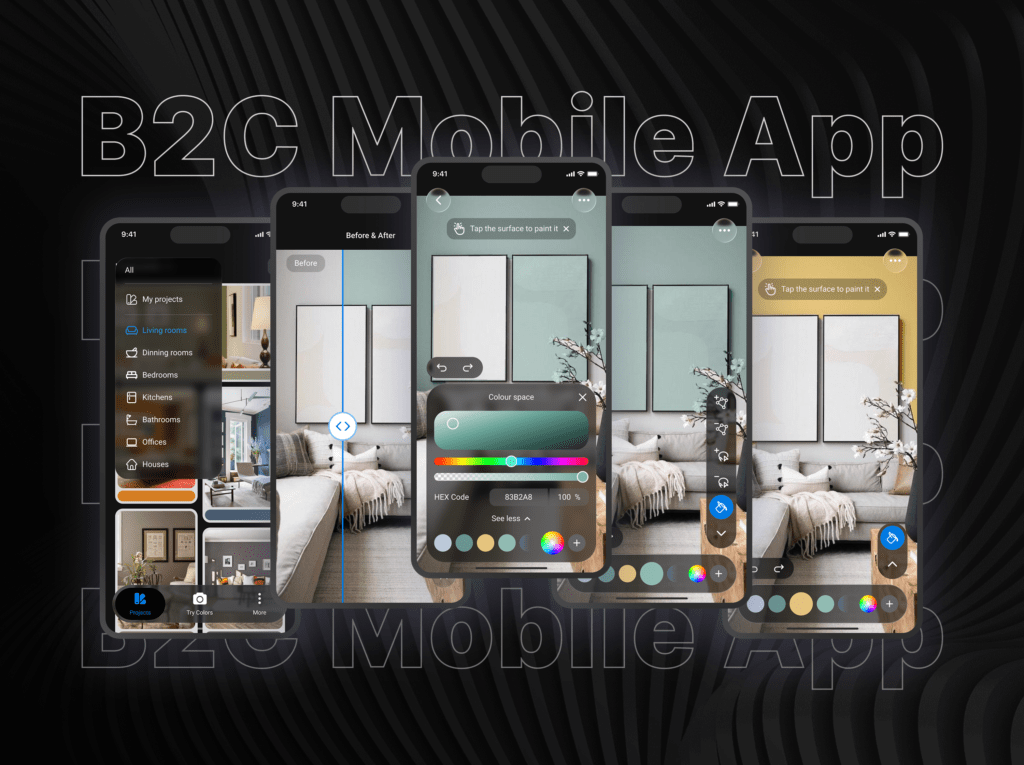
I designed the experience around a simple journey: Discover → Visualize → Experiment → Refine → Decide.
The onboarding introduces the app with minimal friction, while the Home screen brings together recent projects and room inspiration to help users get started quickly.
The Try Color flow lets users capture or upload a room, select a wall, and instantly experiment with different colors. Advanced controls such as area refinement, opacity, and HEX values are progressively revealed only when needed, keeping the core experience simple.
Features like Before & After, Save, Share, and Wall Styles support users as they move from exploration to a confident decision.
Visual Design
- Neutral UI to keep colors prominent
- Minimal, consistent iconography
- Spacious layouts and clear hierarchy
- Progressive disclosure to reduce complexity
The result is a guided visualization experience that makes choosing a wall color feel simple, intuitive, and confident.
Prototype
Explore the interactive prototype below to experience the complete user journey.
Closing Note
This project focused on turning a simple idea into a clear, intuitive, and engaging mobile experience. By balancing visual exploration with guided interactions, the design helps users move from inspiration to confident decisions—without making the experience feel complicated.